How to Sell on Instagram Without a Website (Free, Step by Step)
Sell on Instagram without a website: set up a free link-in-bio store, write a bio that converts, take orders by DM or WhatsApp, and get paid.
By the WAStore team10 min read
In this guide
- Can you really sell on Instagram without a website?
- Four ways to sell on Instagram without a website
- Step 1: Switch to a professional account
- Step 2: Write a profile that sells
- Step 3: Set up a link-in-bio store
- Step 4: Post content that sells
- Step 5: Handle orders and DMs efficiently
- Step 6: Get paid without a website
- Step 7: Deliver and follow up
- Mistakes that cost Instagram sellers orders
- When should you get a real website?
- Your setup checklist
- Frequently asked questions
You don't need a website to sell on Instagram. Thousands of bakers, boutiques, jewellery makers, plant shops and resellers run real businesses from a profile, a link in bio and their messages. What you do need is a way to answer four questions for every customer: what do you sell, how much is it, how do I order, and how do I pay?
This guide shows a free setup that answers all four without building a website — and keeps it simple enough to run from your phone.
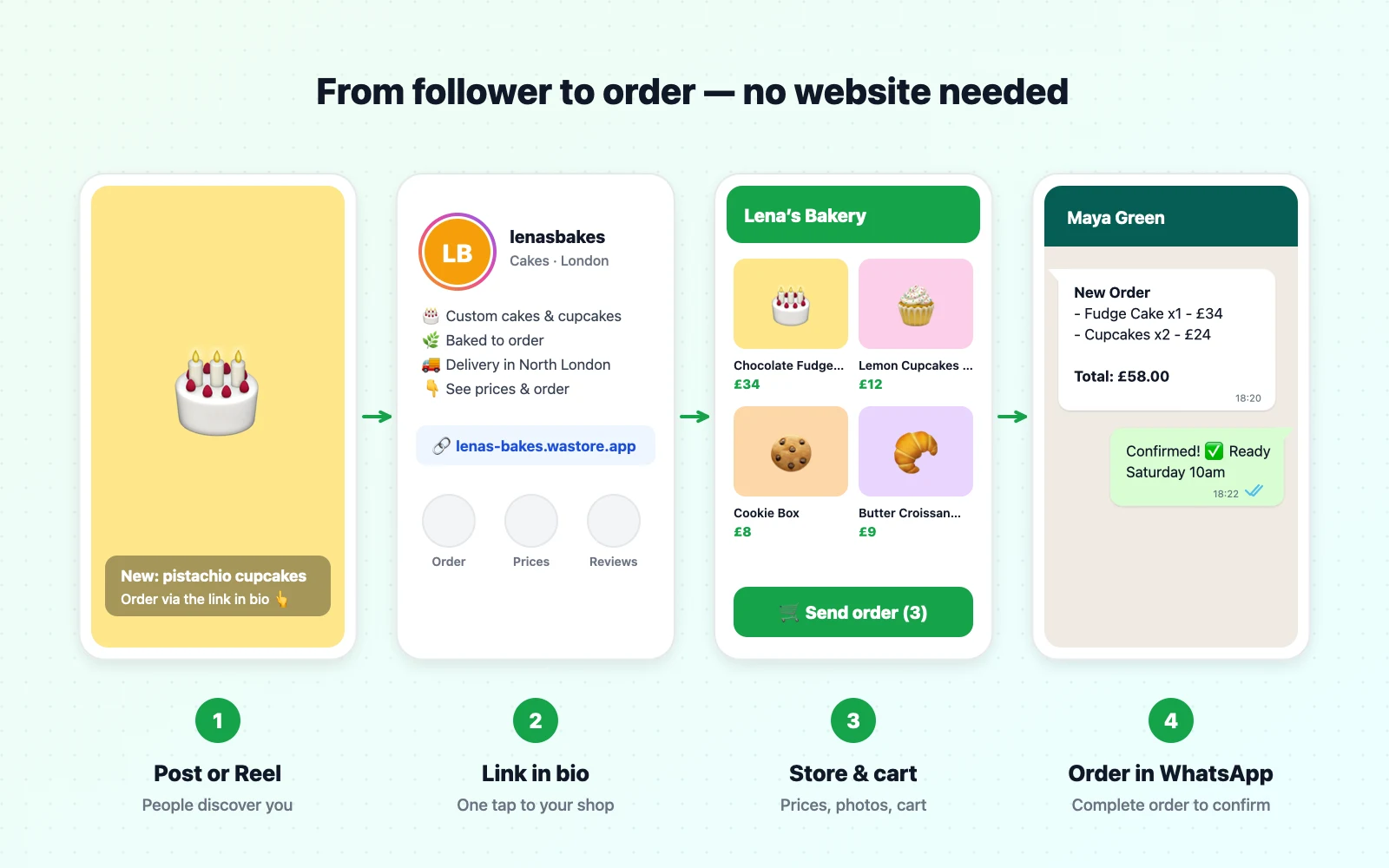
Can you really sell on Instagram without a website?
Yes. Instagram is where people discover products, and messages are where many small sales are agreed — no website required. The catch is that Instagram on its own is a poor shop window. Posts get buried, prices hide in captions, and every interested follower sends the same three questions by DM.
Instagram does have built-in shopping features, but they come with conditions. To use them you generally need a professional account, to be in a supported market, to sell physical goods that meet Meta's commerce policies, and to manage a product catalog in Meta's Commerce Manager. In many markets, tapping a tagged product sends the shopper to a website to buy. So "sell on Instagram without a website" usually means replacing the website with something much simpler, not doing without a shop entirely.
Four ways to sell on Instagram without a website
| Method | How customers order | Cost | Good for | Watch out for |
|---|---|---|---|---|
| DMs only | They message you, you agree the order in chat | Free | Very small volume, one-off pieces | Endless "how much?" messages, lost orders |
| Link-in-bio store + WhatsApp or DM | They browse your store, fill a cart and send the order to your chat | Free to low cost | Most small sellers | Keep the store up to date |
| Instagram shopping features | They tap product tags; often finish on a website | Free, but needs eligibility and a catalog | Brands that qualify in supported markets | Setup and approval; may still need a store link |
| Marketplace (Etsy, Vinted, etc.) linked from your bio | They buy on the marketplace | Listing fees and commission | Handmade, vintage, resale | Fees, and the customer relationship belongs to the marketplace |
For most small businesses the second option is the sweet spot: free or cheap, quick to set up, and it turns your bio link into a real shop.
Step 1: Switch to a professional account
Go to Settings → Account type and tools → Switch to professional account, choose Business (or Creator if you're a maker who's also the brand), and pick your category.
It's free, and it gives you:
- Insights — which posts bring visits, follows and link taps.
- Contact buttons — email, call or WhatsApp right on your profile.
- Saved replies in DMs — the Instagram version of quick replies.
- Access to shopping and ad tools, where available.
Step 2: Write a profile that sells
Your profile has about three seconds to tell a visitor they're in the right place.
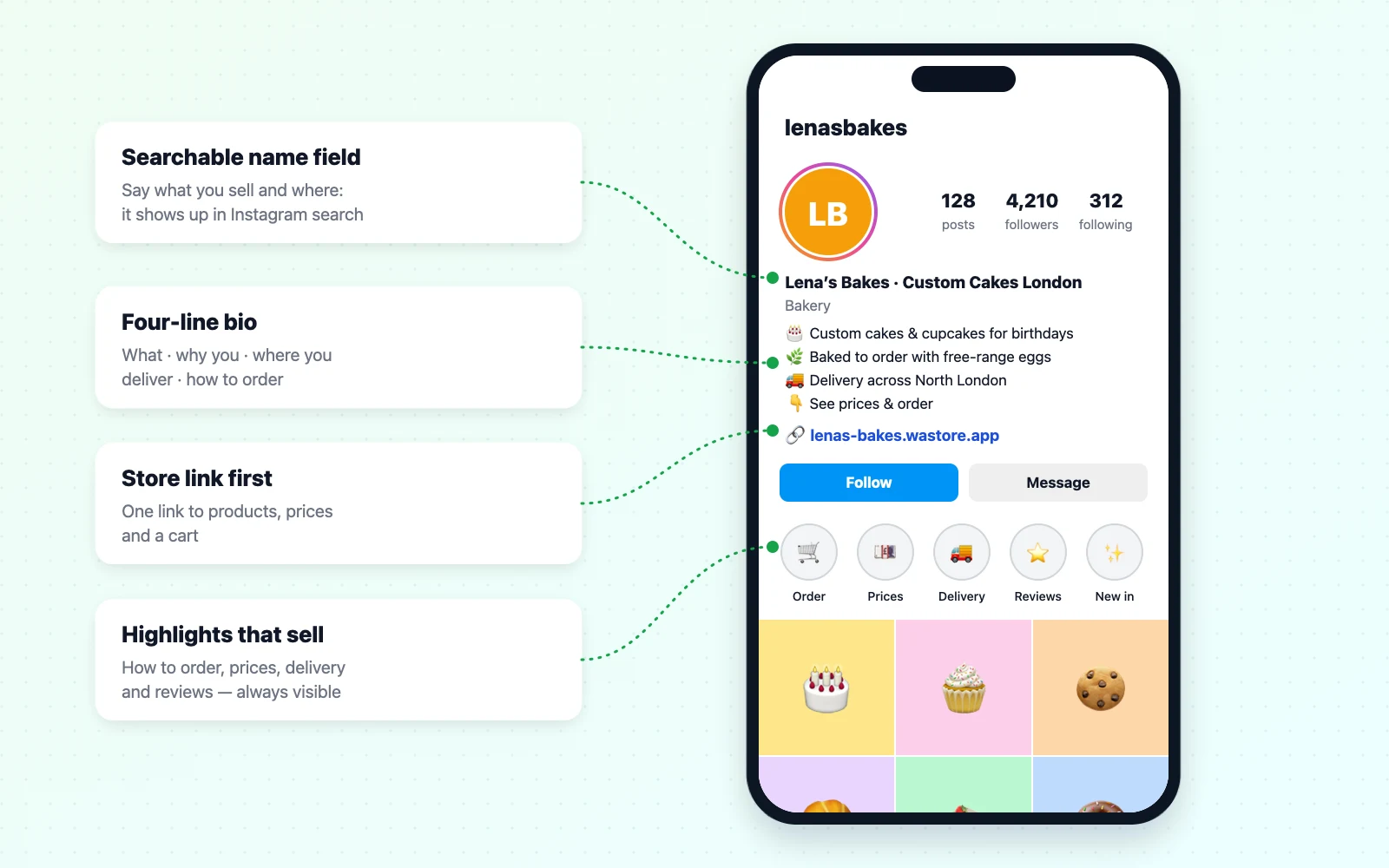
Name field. This is searchable, separately from your @handle. Include what you sell: Lena's Bakes · Custom Cakes London is found by more people than Lena's Bakes.
Bio. Use four short lines: what you sell, who it's for or what makes it special, where you deliver, and how to order. Some examples:
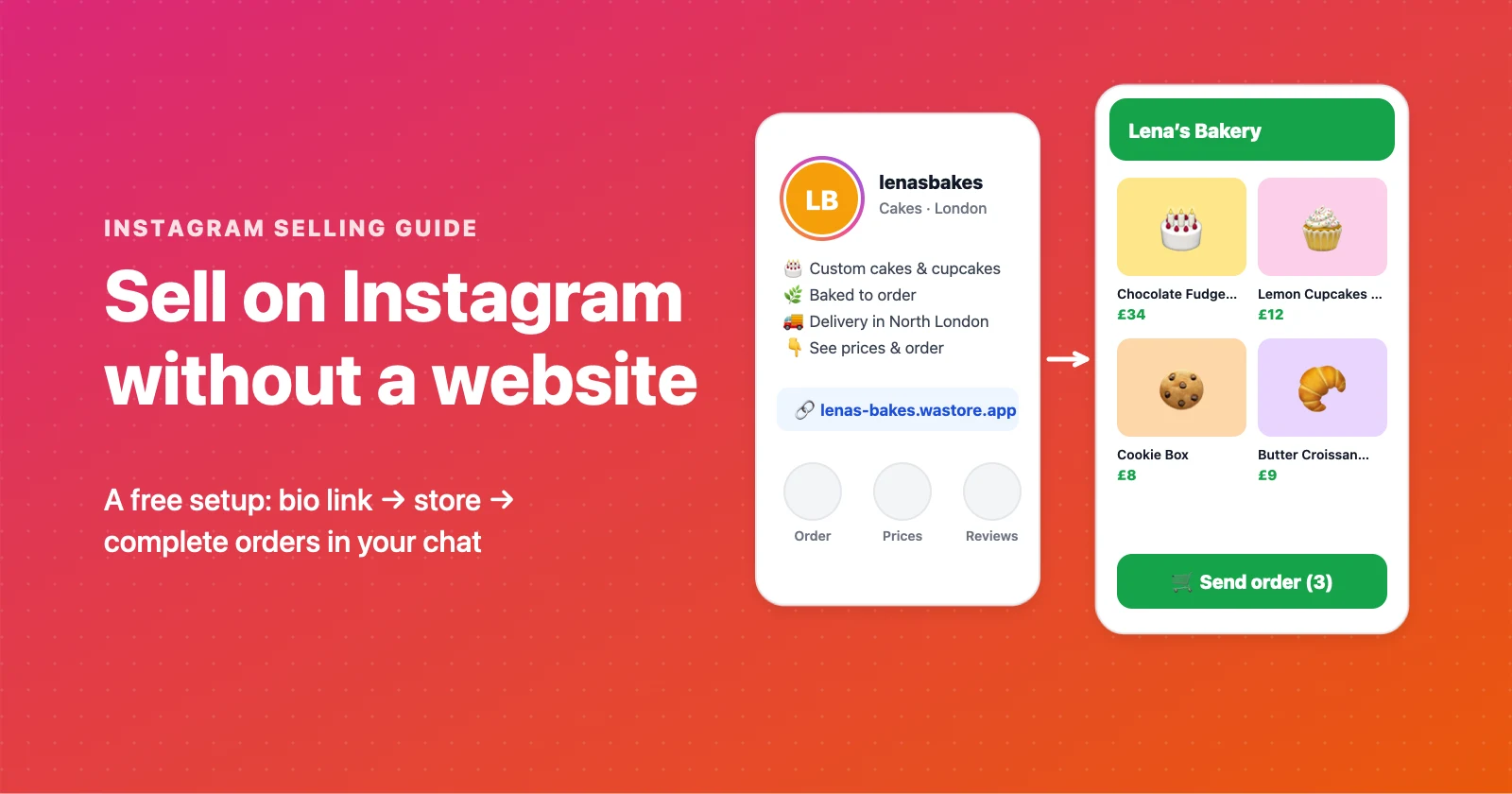
🎂 Custom cakes & cupcakes for birthdays and weddings
🌿 Baked to order with free-range eggs
🚚 Delivery across North London · Pickup in Camden
👇 See prices & order
💍 Handmade sterling silver jewellery
✨ Minimal pieces you'll wear every day
📦 Ships worldwide in 2–4 days
👇 Shop the collection
🌱 Rare houseplants & easy-care plants
🪴 Pots, soil and plant care help included
📍 Pickup in [city] · Local delivery Saturdays
👇 Today's plants & prices
Link. Instagram allows several profile links, but the first one is the one people tap. Make it your store.
Highlights. Pin Story highlights that answer questions before they're asked: How to order, Prices, Delivery, Reviews, New in.
Step 3: Set up a link-in-bio store
A classic link-in-bio page is a list of buttons. That's fine for a creator, but a seller needs more: products with photos and prices, categories, a cart, and an order that reaches you complete.
Here's the setup with WAStore, which is free for up to 50 products:
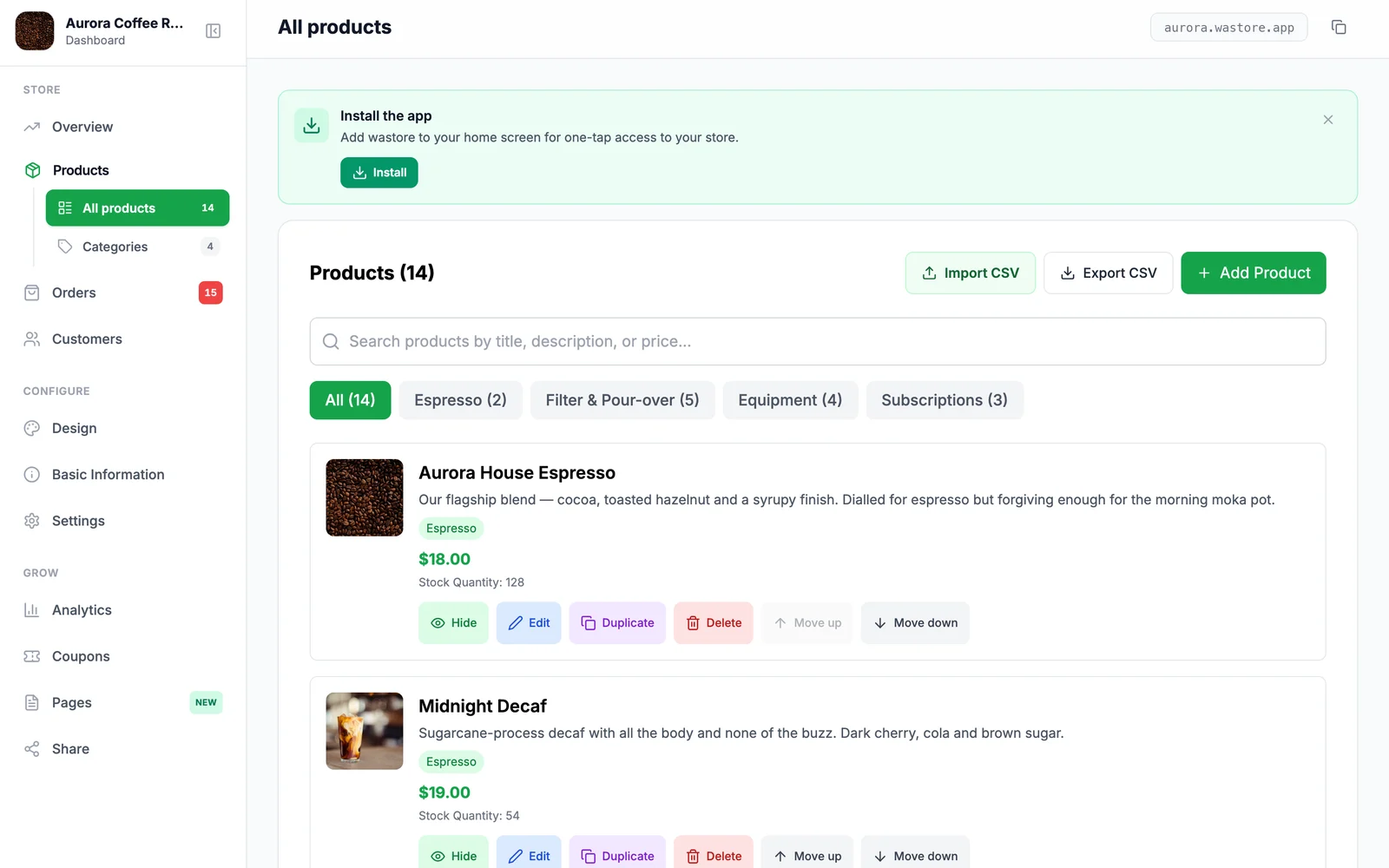
- Create your store — name, currency and the WhatsApp number orders should go to. It takes about 90 seconds.
- Add your products — photo, name, price and a short description. Group them into categories like Cakes, Cupcakes and Boxes. If you have a spreadsheet, import it as a CSV.
- Make it yours — add your logo, choose a theme and colours, and set your delivery or pickup details.
- Copy your store link and paste it as the first link in your Instagram profile.
From now on, a follower who likes a post taps your bio link, browses everything with prices, adds items to the cart and taps Send order. The full order — items, quantities, total, name and delivery details — arrives in your WhatsApp chat, ready to confirm.
Step 4: Post content that sells
Instagram rewards content people watch, save and share. The good news is that selling content and engaging content overlap more than you'd think.
Show the product in use. A ring on a hand, a cake being cut, a jacket on a real person walking down the street. Context sells better than a white background.
Make Reels that answer questions. How big is it really?, What's inside the gift box?, How we pack your order. Each answer is a Reel, and each Reel removes a reason not to buy.
Use Stories every day. Stories are where your warmest followers are. Post new stock, behind the scenes, polls ("Which flavour next week?") and the link sticker pointing straight to a product.
Post carousels for collections. A carousel of a new drop — first image the hero shot, last slide "How to order" — gets saves and swipes.
Share customer photos and reviews. Social proof is the most convincing content you have. Ask happy customers to tag you, then reshare.
End every post with how to order. "Tap the link in our bio to order" sounds obvious, but posts that say it get more orders than posts that don't.
Step 5: Handle orders and DMs efficiently
Even with a store link, you'll get messages. Set up a system so they don't take over your day.
- Saved replies. In Instagram, save answers to your top questions — prices, delivery, sizing, payment — and insert them with a shortcut.
- Send people to your store. Most "how much?" and "is it available?" messages are best answered with the product link.
- Take the order in one place. If orders come in by Instagram DM and WhatsApp and comments, something will get missed. Let the store send everything to WhatsApp, and treat DMs as a front door. Our WhatsApp message templates help you reply fast.
- Confirm in writing. Repeat the items, total, payment method and delivery date back to the customer before you start.
Step 6: Get paid without a website
You don't need a checkout page to get paid reliably. Choose the methods your customers already use:
| Method | How it works | Good to know |
|---|---|---|
| Bank transfer | Send your account details after confirming the order | Ask for the transfer screenshot and a reference |
| Mobile money / instant payments | UPI, Pix, M-Pesa, BLIK, PayNow and similar | Fast and familiar in many countries |
| Payment link | A PayPal, Stripe or bank payment link for the exact amount | Lets customers pay by card without a website |
| Card at checkout | Some store builders take card payments during checkout | WAStore Pro supports card payments through your own Stripe account |
| Cash on delivery or pickup | Customer pays when they receive the order | Simple, but confirm orders carefully to avoid no-shows |
Whatever you choose, say it clearly in your store, your highlights and your confirmation message.
Step 7: Deliver and follow up
- Be clear about delivery areas, days and fees before the customer orders.
- Package for the photo. Customers who love the unboxing post it, and that post is free advertising.
- Follow up after delivery. A short "Did everything arrive okay?" message catches problems early and is the perfect moment to ask for a review or a tag.
- Invite repeat purchases. Tell customers how to hear about new drops — a broadcast list or a channel works well (see broadcast lists vs groups vs channels).
Mistakes that cost Instagram sellers orders
Hiding prices. "DM for price" filters out exactly the busy, decisive buyers you want.
A bio link that leads to a menu of links. Every extra tap loses people. Link directly to your products.
Out-of-date stock. Nothing frustrates a buyer more than finding out the item they chose sold out last week. Mark items sold out in your store as soon as they go.
Inconsistent photos. Use the same light, background and angles, so your grid and your store look like one brand. Natural daylight next to a window beats most phone flash photos.
Weak product descriptions. A photo gets attention; the description answers the questions that close the sale. See how to write product descriptions that sell.
No follow-up. Most repeat business comes from customers who were reminded you exist.
When should you get a real website?
A link-in-bio store goes a long way. Consider a full website when:
- you're processing many orders a day and need automated shipping labels, inventory sync and accounting integrations,
- you want to rank in Google for lots of product searches,
- you sell to businesses who expect invoices, accounts and wholesale pricing,
- or you're expanding to marketplaces and need one system to manage them all.
Until then, a profile, a bio link and your chat are a perfectly professional way to run a shop — and much cheaper. For a comparison with Instagram's own shopping features, see WAStore vs Instagram Shop.
Your setup checklist
- Professional account switched on
- Searchable name field and a four-line bio
- Store link first in your profile
- Highlights for How to order, Prices, Delivery and Reviews
- Products with photos, prices and short descriptions
- Saved replies for your top questions
- Payment methods and delivery details written down
- A posting rhythm you can keep
Ready to start? Create your free link-in-bio store and put your products, prices and a cart one tap away from every follower.
Frequently asked questions
Can you sell on Instagram without a website?
Yes. Many small businesses sell entirely through Instagram posts, Stories and direct messages, using a simple link-in-bio store instead of a website. Customers browse your products from the link, and orders arrive by DM or WhatsApp.
Do I need a business account to sell on Instagram?
You can sell from any account, but switching to a free professional account (Business or Creator) gives you insights, contact buttons, saved replies for DMs and access to shopping features where available. It costs nothing and you can switch back.
Can I open an Instagram Shop without a website?
Instagram's native shopping features have eligibility rules: you need a professional account, to be in a supported market, to sell physical goods that follow Meta's commerce policies, and a product catalog. In many markets, tagged products send shoppers to a website to complete the purchase, so a simple online store link is still useful.
What is the best free link-in-bio store for selling on Instagram?
Look for a link-in-bio tool that shows products with photos and prices, has a cart, and sends complete orders somewhere you'll see them, such as WhatsApp. WAStore is free for up to 50 products and sends orders straight to your WhatsApp chat.
How do I get paid when I sell on Instagram without a website?
Common options are bank transfer, mobile money or UPI, payment links from PayPal or Stripe, and cash on delivery or pickup. Some store builders also let you accept card payments at checkout through your own Stripe account.
How many links can I put in my Instagram bio?
Instagram lets you add up to five links to your profile, but only the first is shown prominently. Put your store link first and keep it the same, so it can live in your Stories highlights, captions and printed materials too.
Should I write 'DM for price' on Instagram?
It's better to show prices. 'DM for price' adds a step, makes some customers assume the price is high, and buries you in repetitive messages. A store link with prices lets serious buyers order straight away.
How often should I post to sell on Instagram?
Consistency matters more than volume. Three to five feed posts or Reels a week plus daily Stories is a realistic rhythm for a small seller. Every product post should tell people how to order.
Build a free WhatsApp store in about 90 seconds
Catalog, cart and WhatsApp orders — free for up to 50 products.
Get started